manuals.online logo
Brands
  1. Home
  2. •
  3. Brands
  4. •
  5. Assa Abloy
  6. •
  7. Door Lock
  8. •
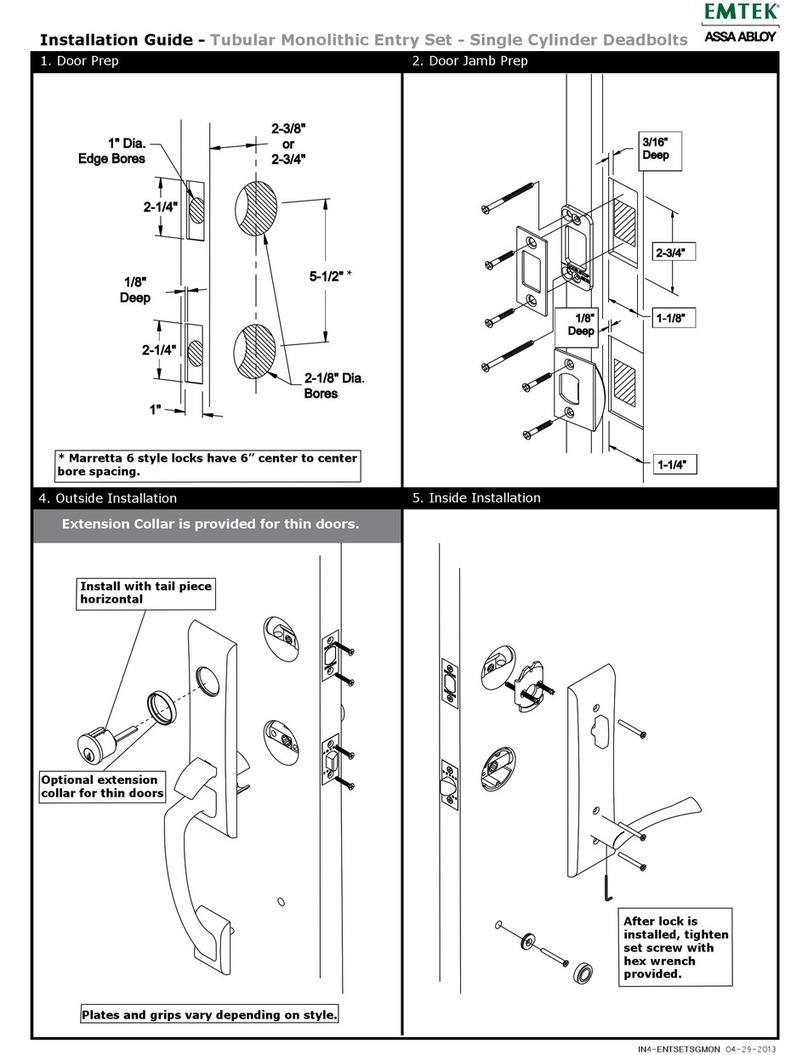
  9. Assa Abloy Corbin Russwin MP9800 Series User manual

Assa Abloy Corbin Russwin MP9800 Series User manual

Other manuals for Corbin Russwin MP9800 Series

1

Other Assa Abloy Door Lock manuals

Assa Abloy Yale Pro SL Technical specifications

Assa Abloy

Assa Abloy Yale Pro SL Technical specifications

Assa Abloy Sargent PE8900 Series User manual

Assa Abloy

Assa Abloy Sargent PE8900 Series User manual

Assa Abloy Corbin Russwin Access 800 9800 TCWI1 Series User manual

Assa Abloy

Assa Abloy Corbin Russwin Access 800 9800 TCWI1 Series User manual

Assa Abloy Yale Doorman User manual

Assa Abloy

Assa Abloy Yale Doorman User manual

Assa Abloy Harmony H1 User manual

Assa Abloy

Assa Abloy Harmony H1 User manual

Assa Abloy Corbin Russwin ED3400 Series User manual

Assa Abloy

Assa Abloy Corbin Russwin ED3400 Series User manual

Assa Abloy ML55 PA User manual

Assa Abloy

Assa Abloy ML55 PA User manual

Assa Abloy Liscio User manual

Assa Abloy

Assa Abloy Liscio User manual

Assa Abloy Corbin Russwin Access 700 ED5000N Series User manual

Assa Abloy

Assa Abloy Corbin Russwin Access 700 ED5000N Series User manual

Assa Abloy Yale real Living Assure Lock SL Technical specifications

Assa Abloy

Assa Abloy Yale real Living Assure Lock SL Technical specifications

Assa Abloy Corbin Russwin Access 600 CL33600 TCRNE1... User manual

Assa Abloy

Assa Abloy Corbin Russwin Access 600 CL33600 TCRNE1... User manual

Assa Abloy Sargent PE8893 User manual

Assa Abloy

Assa Abloy Sargent PE8893 User manual

Assa Abloy ANYKEY User manual

Assa Abloy

Assa Abloy ANYKEY User manual

Assa Abloy Lockwood Cavity Lock User manual

Assa Abloy

Assa Abloy Lockwood Cavity Lock User manual

Assa Abloy EL460 User manual

Assa Abloy

Assa Abloy EL460 User manual

Assa Abloy Yale Luna Pro User manual

Assa Abloy

Assa Abloy Yale Luna Pro User manual

Assa Abloy 1584 Series User manual

Assa Abloy

Assa Abloy 1584 Series User manual

Assa Abloy SARGENT 80 Series User manual

Assa Abloy

Assa Abloy SARGENT 80 Series User manual

Assa Abloy eCLIQ User manual

Assa Abloy

Assa Abloy eCLIQ User manual

Assa Abloy Corbin Russwin BLSS ML2000 Series User manual

Assa Abloy

Assa Abloy Corbin Russwin BLSS ML2000 Series User manual

Assa Abloy Corbin Russwin EcoFlex NAC Series Assembly instructions

Assa Abloy

Assa Abloy Corbin Russwin EcoFlex NAC Series Assembly instructions

Assa Abloy Yale YD-01-CON-NOMOD-PB User manual

Assa Abloy

Assa Abloy Yale YD-01-CON-NOMOD-PB User manual

Assa Abloy Yale 446F User manual

Assa Abloy

Assa Abloy Yale 446F User manual

Assa Abloy Sargent 7800 Series User manual

Assa Abloy

Assa Abloy Sargent 7800 Series User manual

Popular Door Lock manuals by other brands

Iseo MA1A installation guide

Iseo

Iseo MA1A installation guide

ID Lock 150 user manual

ID Lock

ID Lock 150 user manual

Lockly ACCESS TOUCH PRO user manual

Lockly

Lockly ACCESS TOUCH PRO user manual

iLoq G50S user guide

iLoq

iLoq G50S user guide

SDC Z7835 installation instructions

SDC

SDC Z7835 installation instructions

ilco 452 Installation

ilco

ilco 452 Installation

Samsung shs-h705 user guide

Samsung

Samsung shs-h705 user guide

TRU-BOLT 08102017 user manual

TRU-BOLT

TRU-BOLT 08102017 user manual

CDVI 500-LADJ quick start guide

CDVI

CDVI 500-LADJ quick start guide

Igloohome Deadbolt 2S Metal Grey Installer/user guide

Igloohome

Igloohome Deadbolt 2S Metal Grey Installer/user guide

eSSL FL-300 user manual

eSSL

eSSL FL-300 user manual

Dorma MUNDUS PREMIUM GK 50 Mounting instruction

Dorma

Dorma MUNDUS PREMIUM GK 50 Mounting instruction

SCOOP Pullbloc 4.1 FS Panik Assembly instruction

SCOOP

SCOOP Pullbloc 4.1 FS Panik Assembly instruction

Yale MORTISE 8800 SERIES installation instructions

Yale

Yale MORTISE 8800 SERIES installation instructions

Siegenia KFV AS3500 Assembly instructions

Siegenia

Siegenia KFV AS3500 Assembly instructions

Saflok Quantum ädesē RFID installation instructions

Saflok

Saflok Quantum ädesē RFID installation instructions

ArrowVision Shepherd 210 installation manual

ArrowVision

ArrowVision Shepherd 210 installation manual

Baldwin 009 Series quick start guide

Baldwin

Baldwin 009 Series quick start guide

manuals.online logo
manuals.online logoBrands
  • About & Mission
  • Contact us
  • Privacy Policy
  • Terms and Conditions

Copyright 2025 Manuals.Online. All Rights Reserved.

1 of 20
MP9800 Series Multi-Point Lock
with MELR Option (Electric Latch Retraction)
®
ASSA ABLOY
ASSA ABLOY, the global leader in door opening solutions
FM435 (08/16)
Copyright © 2016 Corbin Russwin Inc., an ASSA ABLOY Group company.
All rights reserved. Reproduction in whole or in part without the express written
permission of Corbin Russwin, Inc. is prohibited.
Installation Instructions
MP9800 Series Multi-Point Lock
with MELR Option (Electric Latch Retraction)
®
ASSA ABLOY
2 of 20
MP9800 Series Multi-Point Lock
with MELR Option (Electric Latch Retraction)
®
ASSA ABLOY
Copyright © 2016 Corbin Russwin Inc., an ASSA ABLOY Group company.
All rights reserved. Reproduction in whole or in part without the express written
permission of Corbin Russwin, Inc. is prohibited.
FM435 (08/16)
ASSA ABLOY, the global leader in door opening solutions
Warnings
1
Table of Contents
This device complies with Part 15 of the FCC Rules. Operation is subject to the following two conditions:
(1) This device may not cause harmful interference, and
(2) This device must accept any interference received, including interference that may cause undesired operation.
Note: This equipment has been tested and found to comply with the limits for a Class B digital device, pursuant to Part 15 of the FCC Rules.
These limits are designed to provide reasonable protection against harmful interference in a residential installation.
This equipment generates, uses and can radiate radio frequency energy and if not installed and used in accordance with the instructions, may cause
harmful interference to radio communications. However, there is no guarantee that the interference will not occur in a particular installation. If this
equipment does cause harmful interference to radio or television reception, which can be determined by turning the equipment off and on, the user is
encouraged to try to correct the interference by one or more of the following measures:
• Reorient or relocate the receiving antenna
• Increase the separation between the equipment and receiver
• Connect the equipment into an outlet on a circuit different from that to which the receiver is connected
• Consult the dealer or an experienced TV technician for help
This Class B digital apparatus complies with Canadian ICES-003.
Cet appareil numérique de la classe B est conforme avec la norme NMB-003 du Canada.
The term “IC:” before the radio certification number only signifies that Industry Canada technical specifications were met. This Class B digital apparatus
meets all requirements of the Canadian Interference Causing Equipment Regulations.
Cet appareillage numérique de la classe B répond à toutes les exigences de l’interférence canadienne causant des règlements d’équipement.
L'opération est sujette aux deux conditions suivantes:
(1) ce dispositif peut ne pas causer l’interférence nocive, et
(2) ce dispositif doit accepter n’importe quelle interférence reçue, y compris l’interférence qui peut causer l’opération peu désirée.
1
2
3
4
5
6
7
Warnings ........................................................................................................................................................................... 2
General Description ..................................................................................................................................................... 3
Hardware Specifications ......................................................................................................................................... 3
Electronic Specifications ......................................................................................................................................... 3
Parts Breakdown .......................................................................................................................................................... 4
Installation Instructions ......................................................................................................................................5-8
....................................................................................................................................................9-10
Wiring Diagrams
........................................................................................................................ 10
Mechanical Operational Check
.....................................................................................................................11-18
Electrical Operational Check
8
9
Changes or modifications to this unit could void the user’s authority to operate the equipment.
ALWAYS disconnect power before making any electrical or mechanical adjustments to the system.
Observe precautions for handling electrostatic sensitive devices.
Important: Any retroit or other field modification to a fire rated opening can potentially impact the fire rating of the opening, and Corbin Russwin Inc.
makes no representations or warranties concerning what such impact may be in any specific situation. When retrofitting any portion of an existing fire
rated opening, or specifying and installing a new fire-rated opening, please consult with a code specialist or local code official (authority having
jurisdiction) to ensure compliance with all applicable codes and ratings

3 of 20
MP9800 Series Multi-Point Lock
with MELR Option (Electric Latch Retraction)
®
ASSA ABLOY
ASSA ABLOY, the global leader in door opening solutions
FM435 (08/16)
Copyright © 2016 Corbin Russwin Inc., an ASSA ABLOY Group company.
All rights reserved. Reproduction in whole or in part without the express written
permission of Corbin Russwin, Inc. is prohibited.
General Description
2
Hardware Specifications
3Electronic Specifications
4
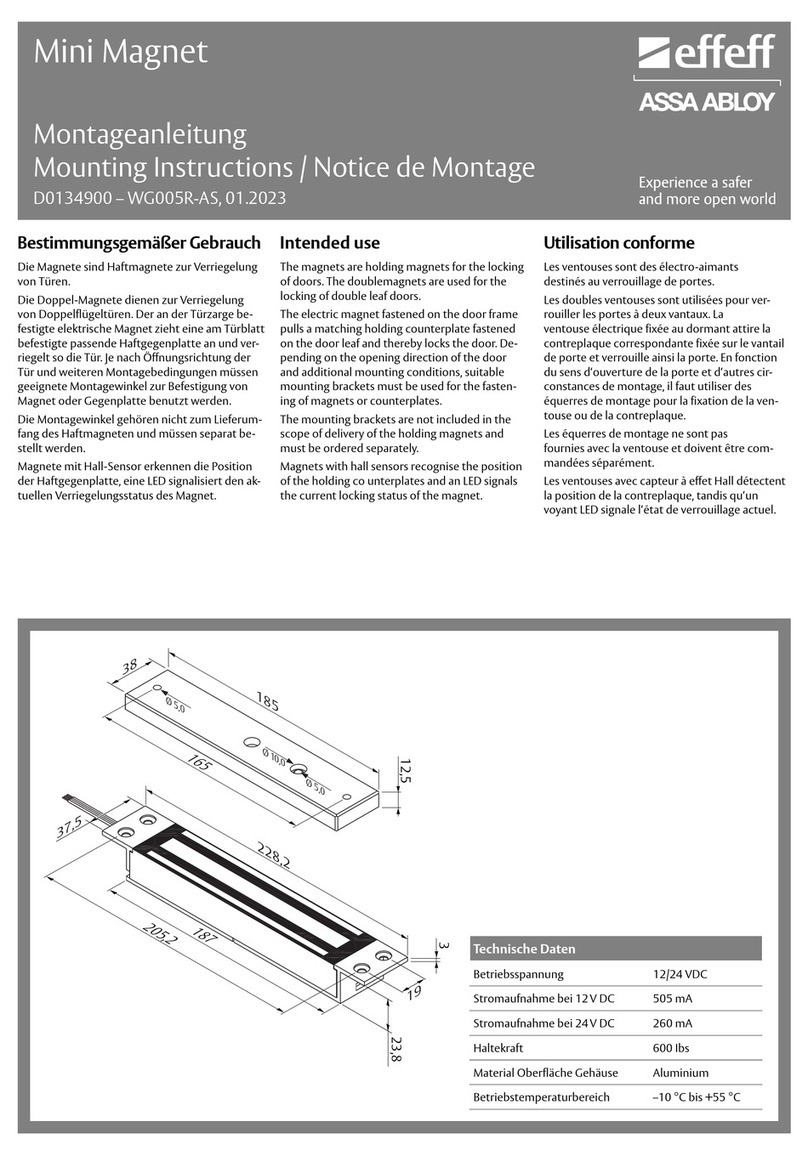
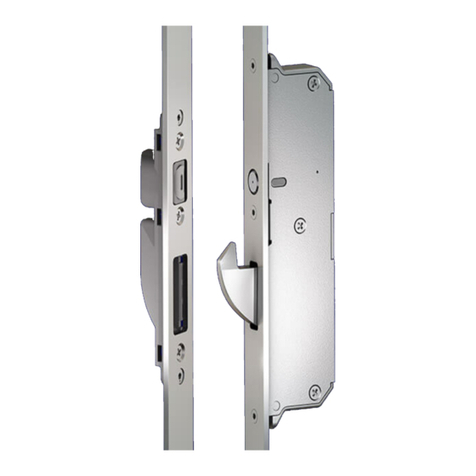
The Corbin Russwin stand alone MP9800 x MELR series multi point lock is designed to automatically retract the rods, concealed within the door.
Wire Gauge Charts
1. Functions
The MP9800 x MELR can be configured to work in either of two modes:
POWER MODE (see Section 9: Electrical Operation, Section I: POWER MODE)
The device is not energized when locked. When electrified, the device will retract and remain in the retracted position until power
is removed. Power is typically applied through a relay triggered by an access control device.
TIMER MODE (see Section 9: Electrical Operation, Section II: TIMER MODE)
The device is always energized and retraction is triggered by a momentary or maintain switch.
In TIMER MODE:
When the timer circuit is closed using a momentary switch, the device retracts, remains retracted for a set duration, and releases.
The duration of the retraction is set through an onboard timer setting. When the timer circuit is closed using a maintain switch, the
device retracts. The device releases when the contact is opened.
2. Important:
Caution: Disconnect all input power before servicing. Installer must be a trained and experienced service person.
Wiring must comply with applicable local electrical codes, ordinances and regulations.
3. Installation Notes
Earth Ground: Required for electrostatic discharge (ESD) protection, unless already grounded through the metal door and frame.
All Access 600 Multi Point Locks
• Fire rated devices available
• UL and CUL listed for use on Fire Doors
• Multi point lock furnished for 1-3/4" doors
• Wire from EAC Panel to door must be shielded with a
drain terminated at EAC Panel controller
12VDC System
• 12VDC MELR Draw= 850mA
24VDC System
• 24VDC MELR Draw = 700mA
Total
One-Way
Length of
Wire Run (ft)
Load Current @ 12VDC
1/4A 1/2A 3/4A 1A 1-1/4A 1-1/2A 2A 3A
100 20 18 16 14 14 12 12 10
150 18 16 14 12 12 12 10 —
200 16 14 12 12 10 10 — —
250 16 14 12 10 10 10 — —
300 16 12 12 10 10 — — —
400 14 12 10 — — — — —
500 14 10 10 — — — — —
750 12 10 — — — — — —
1,000 10 — — — — — — —
1,500 10 — — — — — — —
Total
One-Way
Length of
Wire Run (ft)
Load Current @ 24VDC
1/4A 1/2A 3/4A 1A 1-1/4A 1-1/2A 2A 3A
100 24 20 18 18 16 16 14 12
150 22 18 16 16 14 14 12 10
200 20 18 16 14 14 12 12 10
250 18 16 14 14 12 12 12 10
300 18 16 14 12 12 12 10 —
400 18 14 12 12 10 10 — —
500 16 14 12 10 10 — — —
750 14 12 10 10 — — — —
1,000 14 10 10 — — — — —
1,500 12 10 — — — — — —
Tools Required -
(Same for all Series Products)
• Phillips screw driver
• Slotted screw driver
• Drill with bits
• #8-32 tap & drill (for metal door applications)
4 of 20
MP9800 Series Multi-Point Lock
with MELR Option (Electric Latch Retraction)
®
ASSA ABLOY
Copyright © 2016 Corbin Russwin Inc., an ASSA ABLOY Group company.
All rights reserved. Reproduction in whole or in part without the express written
permission of Corbin Russwin, Inc. is prohibited.
FM435 (08/16)
ASSA ABLOY, the global leader in door opening solutions
Parts Breakdown
5
MP9800 x MELR Series
Top Case Assembly
Top Rod and Bolt Assembly
MELR Assembly
Mounting Hardware
Cover Assembly
Inside Trim Assembly
Inner Chassis Assembly
Inner Chassis Assembly, Fire
Monitoring Inner Chassis, Fire
Bottom Rod and Bolt Assembly
Bottom Case
Outside Trim Assembly
®
ASSA ABLOY
Installation Instructions
6
Fig. 1- Handing
Fig. 3- Top Case
Installation
Fig. 2-
Metal Door Prep
A) Door Preparation
1. Verify Hand and Bevel of Door -(Figure 1)
2. Door Preparation
B) Rod and Top Case Installation
1. Refer to instruction sheet FM438 for rod and inner case installation
on metal doors.
2. Refer to instruction sheet FM436 for rod and inner case installation
on wood doors. (Figure 3).
• Check hand of door. The Multi-Point lock may be handed.
• Door should be fitted and hung.
• Verify box label for size of the Multi-Point lock, function and hand.
If door is not pre-drilled, prepare door according to the appropriate
template. Refer to templates at www.corbinrusswin.com. (Figure 2).
• Metal door (Steel & MPAD): FM438
- Templates: T31242
• Wood door (MPWD): FM436
- Templates: T31243
Left Hand
Reverse
LHR Outside
Inside
Right Hand
Reverse
RHR
Outside
Inside
• Change hand if necessary.
ASSA ABLOY, the global leader in door opening solutions
FM435 (08/16)
Copyright © 2016 Corbin Russwin Inc., an ASSA ABLOY Group company.
All rights reserved. Reproduction in whole or in part without the express written
permission of Corbin Russwin, Inc. is prohibited.
5 of 20
MP9800 Series Multi-Point Lock
with MELR Option (Electric Latch Retraction)
®
ASSA ABLOY
6 of 20
MP9800 Series Multi-Point Lock
with MELR Option (Electric Latch Retraction)
®
ASSA ABLOY
Copyright © 2016 Corbin Russwin Inc., an ASSA ABLOY Group company.
All rights reserved. Reproduction in whole or in part without the express written
permission of Corbin Russwin, Inc. is prohibited.
FM435 (08/16)
ASSA ABLOY, the global leader in door opening solutions
Installation Instructions - con't
6
Fig. 4
Inside Trim
Outside Trim
#1/4" -20 x 3"
1. Mount inside trim lever to outside trim lever using (2) # 1/4" -20
x 3" Phillips oval head machine screws. (Figure 4).
2. Feed wire through the through hole and attach the outside exit
trim to the door.
Install Trim
C) Install Outside and Inside Trim
Template
in Position
Centerline
Wire Hole
Detail of Notch in
Template Aligned to
Vertical Centerline
Fig. 5b-
Template
Wire
Hole
Mark
Vertical
Centerline
Fig. 5a
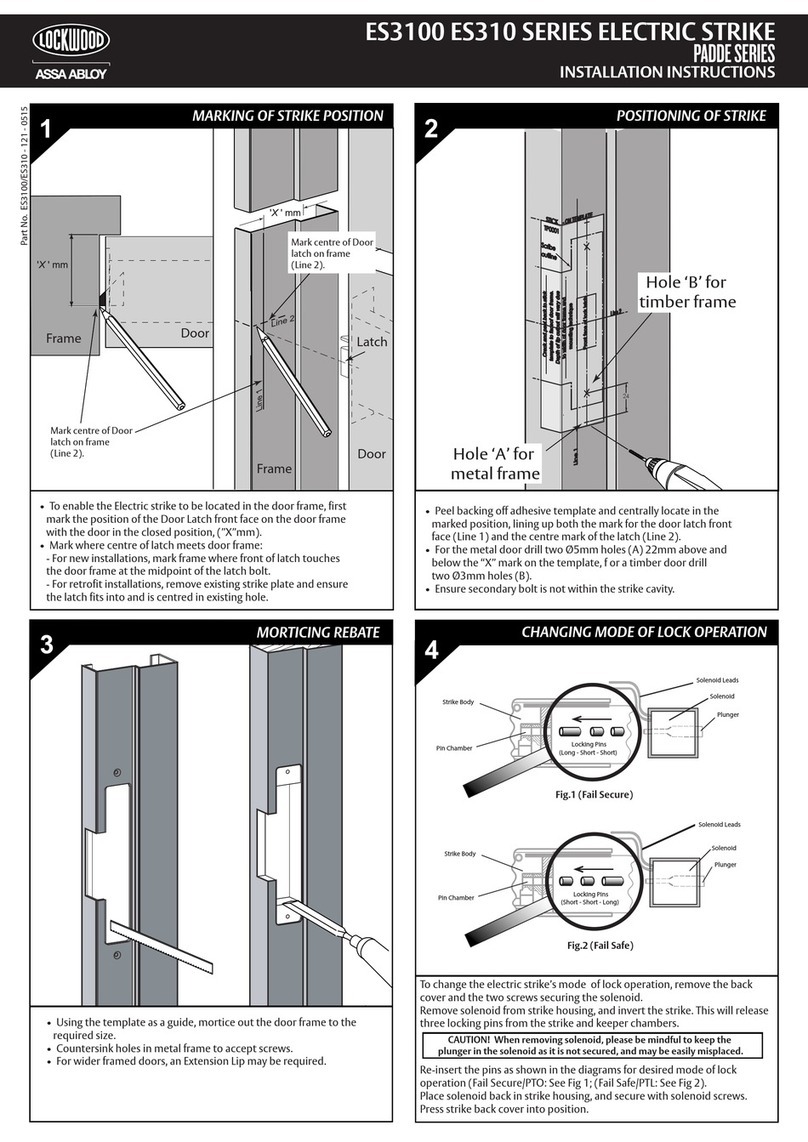
D) Preparation of MELR Mounting Holes (If Required)
1. Mark vertical centerline of slot and wire hole on door. (See Figure 5a).
2. Mount template onto plate as shown. For wood doors, ensure the template
notch is touching the rod to provide lateral positioning. (See Figure 5c).
3. Check that template is square to door. (See Figure 5b).
4. Using template bushings as a guide, drill (4) 1/16" holes. (See Figure 5d).

5. Remove template.
6. For metal door, increase 1/16" pilot holes to #29 (.136)
and tap for #8-32.
Important: If the manufacturer has not pre-drilled the door,
prepare the door per instructions below, using plastic template
included with the device. Screw hole orientation is not affected
by handing. (See Figures 5a-5d). If the door is pre-drilled by the
manufacturer, continue to instructions on the following page.
Fig. 5c
(Wood Door
Shown)
Location Detail of
Template Notch
Touching Rod and
Resting on Plate
Template
Template
Holes
Fig. 5d
®
ASSA ABLOY
7 of 20
MP9800 Series Multi-Point Lock
with MELR Option (Electric Latch Retraction)
®
ASSA ABLOY
ASSA ABLOY, the global leader in door opening solutions
FM435 (08/16)
Copyright © 2016 Corbin Russwin Inc., an ASSA ABLOY Group company.
All rights reserved. Reproduction in whole or in part without the express written
permission of Corbin Russwin, Inc. is prohibited.
Installation Instructions - con't
6
1. Install the upper left mounting screw, #8 - 32 x 5/8" Fillister head for
metal door and #8 x 5/8" self tapping wood screw for wood doors.
(See Figure 6a).
Note: Leave the screw loose enough to slide the MELR assembly on.
2. Snake the wire through the MELR assembly.
3. Slide the mounting bracket of the MELR assembly underneath the
installed screw and secure in place.
IMPORTANT: Ensure MELR retraction lever is resting on plate. (Fig. 7).
4. Completely tighten the upper left mounting screw.
IMPORTANT: Be careful not to pinch or disconnect the wires
located in that area.
5a. Install the remaining (3) #8-32 x 5/8" Fillister mounting screws
on metal doors. (See Figure 6b.)
5b. Install the remaining (3) #8 x 5/8" self tapping wood screws on
wood doors. (See Figure 6b.)
6. Install (2) 1/4" self-tapping screws on either diagonal, one above
molex connector and one below. (Figure 8).
7. Connect the 8-pin molex connectors.
Fig. 6b
E) Installation of MELR Assembly
Fig. 6a
Upper Left
Mounting
Screw
Mounting
Bracket
Door
1/4" Self-Tapping
Screw
#8 x 5/8"
Wood Screw
#8 - 32 x 5/8"
Fillister Head
Machine Screw
Fig. 7- MELR Lever
Resting on Plate
Fig. 8
#8-32 x 5/8"
(2) 1/4" Self-
Tapping Screws
#8-32 x 5/8"
8 of 20
MP9800 Series Multi-Point Lock
with MELR Option (Electric Latch Retraction)
®
ASSA ABLOY
Copyright © 2016 Corbin Russwin Inc., an ASSA ABLOY Group company.
All rights reserved. Reproduction in whole or in part without the express written
permission of Corbin Russwin, Inc. is prohibited.
FM435 (08/16)
ASSA ABLOY, the global leader in door opening solutions
Installation Instructions - con't
6
1. Position escutcheon against door by hooking the top edge on the top of the
MELR assembly. Again, verify that no wires are being pinched.
2. Mount inside escutcheon assembly to plate using (1) #8-32 x 5/8" Phillips lat
head undercut machine screw. (Figure 10).
F) Installation of Inside Escutcheon
Fig. 10
Fig. 9-MELR In
Place On Door
#8-32 x 5/8" Phillips Flat
Head Undercut Machine
Screw
9 of 20
MP9800 Series Multi-Point Lock
with MELR Option (Electric Latch Retraction)
®
ASSA ABLOY
ASSA ABLOY, the global leader in door opening solutions
FM435 (08/16)
Copyright © 2016 Corbin Russwin Inc., an ASSA ABLOY Group company.
All rights reserved. Reproduction in whole or in part without the express written
permission of Corbin Russwin, Inc. is prohibited.
Wiring Diagrams
7
Product 8 PIN CONNECTOR
1-Black 2-Red 3-White 4-Green 5-Orange
ACCESS CONTROL DEVICES: MP9800 x MELR ElectroLynx Wire
Color / Function Assignments
Corbin Russwin
MP9800 xMELR
NEG POS Timer A EGND Timer B
PIN 4 (Green – EARTH GROUND)
PIN 2 (Red – 12 or 24 POS)
PIN 1 (Black – 12 or 24 NEG)
PIN 3 (White – Timer A)
PIN 5 (Orange – Timer B)
1. For use when wiring in TIMER MODE (using the onboard timer).
2. If more than 20 seconds timed delay is necessary, an external
timer delay relay is required (not provided). (Figure 11).
Note: 24V supply is constant in TIMER MODE.
QC12 Electric Hinge
24VDC
Power Supply
0V (Black)
+24V (Red)
EGND
White
Orange
Green (EGND)
Red (+24V)
Black (0V)
Momentary or Maintain or Relay Switch
(Card Reader, Access Control, etc.)
( C )
( NO )
Fig. 11 -TIMER MODE Typical Wiring
A) Timer Mode: Typical Wiring
10 of 20
MP9800 Series Multi-Point Lock
with MELR Option (Electric Latch Retraction)
®
ASSA ABLOY
Copyright © 2016 Corbin Russwin Inc., an ASSA ABLOY Group company.
All rights reserved. Reproduction in whole or in part without the express written
permission of Corbin Russwin, Inc. is prohibited.
FM435 (08/16)
ASSA ABLOY, the global leader in door opening solutions
Wiring Diagrams - con't
7
For use when wiring in POWER MODE. (Figure 12).
Notes:
• Onboard timer will not function in POWER MODE.
Add external time delay if necessary.
• The switch is wired between the power supply and the
load. Do not cycle the power supply.
24VDC
Power Supply
QC12 Electric Hinge
0V (Black)
+24V (Red)
EGND
Green (EGND)
Red (+24V)
Black (0V)
Maintain or Relay Switch, i.e.,
Card Reader, Access Control, etc.
( + )
( - )
( NO )
( NC )
B) Power Mode: Typical Wiring
For devices without cylinders, go to Section 6, Step C.
1. For devices with cylinders, insert key into cylinder and rotate.
2. Rotate the lever to retract latch and rods.
Fig. 12- Power Mode Typical Wiring
Mechanical Operational Check
8