Emos MD-430 User manual

2202019000_31-M0430_00_01 74 × 105 mm
M0430
GB Digital Multimeter
CZ Digitální multimetr
SK Digitálny multimeter
PL Multimetr cyfrowy
HU Digitális multiméter
SI Digitalni multimeter
RS|HR|BA|ME Digitalni multimetar
DE Digitales Multimeter
UA Цифровий мультиметр
RO|MD Multimetru digital
LT Skaitmeninis multimetras
LV Digitālais multimetrs
EE Digitaalne multimeeter
BG Цифров мултиметър
www.emos.eu

2
1
2
3
9
4
85
10
76
1

3
2
GB | Digital Multimeter
Read this instruction manual thoroughly before you begin using
the M0430. It contains particularly important passages concerning
occupational safety principles when using the device. Such passages
are highlighted. Reading the manual will prevent potential injury by
electric current or damage to the device.
The multimeter was designed in accordance with standard EN
61010-1, applying to electronic measuring instruments belonging
to category CAT III 600 V/CAT II 1000 V, pollution degree 2. CAT III is
intended for measuring circuits powered by xed wiring installations,
such as relays, sockets, distribution boxes, feeder lines and short
branching circuits and lighting systems in large buildings.
Category CAT II is intended for measurements made on circuits
directly connected to low-voltage installations (e.g. household
appliances, portable tools and similar equipment).
Do not use the multimeter to measure ranges that fall into the
category IV!
Warning:
Use the M0430 multimeter only in the manner specied below. Other
uses may cause damage to the device or endanger your health.
Comply with the following instructions:
• Before measuring resistance, diodes or current, disconnect the
circuits from the power supply and discharge any high-voltage
A
B

4
capacitors. Use a function appropriate for the given measure-
ment. Before changing the range (or switching functions) dis-
connect the conductors from the circuit that is being measured.
• Make sure the device is undamaged before you begin using the
multimeter. If you nd obvious signs of damage on the body of
the device, do not make any measurements! Check that the
surface of the multimeter does not have scratches and that the
side joints are not coming apart.
• Also check the insulation on the measuring probes. Damaged
insulation may result in injury by electric current. Do not use
damaged measuring probes!
• Do not measure voltages above 1000 V! If you intend to measure
current, check the multimeter‘s fuse and turn o the power
supply to the circuit before you connect the multimeter. Before
measuring, make sure the circular switch for setting measuring
range is in the correct position. Under no circumstances should
you make any changes to the measuring range (by moving the
circular switch for changing measuring programmes) while
measuring! Doing so could damage the device. When you are
measuring, rst connect the black conductor (probe) and then
the red conductor (probe). When disconnecting the testing
conductors, disconnect the red one rst.
• If you nd that the multimeter is making abnormal measure-
ments, stop using it. The fuse may be damaged. If you are unsure
of the cause of the defect, contact a service centre.
• Do not measure voltages higher than listed on the front panel
of the multimeter. Risk of injury by electric current or damage
to the multimeter!
• Check that the multimeter is working properly before use. Test
on a circuit with known electrical values.
• Before you connect the multimeter to a circuit you intend to
measure, turn o the power to the circuit.
• Do not use or store the multimeter in environments with high
temperature, dust or humidity. It is also not recommended to
use the device in environments with potentially strong magnetic
elds or risk of explosion or re.

5
• When changing parts of the multimeter (e.g. the battery or fuse)
use spare parts of the same type and specications. Change
parts only when the multimeter is disconnected and turned o.
• Disconnect the testing conductors from the tested circuit before
opening the rear casing of the device.
• Do not alter or otherwise interfere with the internal circuitry
of the multimeter!
• Be extra careful when measuring voltages higher than 30 V AC
rms, 42 V peak or 60 V DC. Risk of injury by electric current!
• When using measuring tips, make sure you are holding them
behind the nger barriers.
• Do not perform measurements if the multimeter‘s casing is
removed or loose.
• Once the screen shows the low battery icon , replace the
batteries. Otherwise, subsequent measurements may be in-
accurate. Incorrect measurements may then result in injuries
by electric current! Use alkaline batteries only; do not use
re-chargeable batteries.
Maintenance Instructions
Attention
Do not attempt to repair or modify the multimeter in any way if you
are not qualied to do so or do not have access to the necessary
calibration equipment. Make sure that water does not get into the
multimeter – prevents injury by electric current!
• Disconnect the measuring tips from the tested circuit before
opening the casing of the multimeter.
• Regularly clean the body of the multimeter with a moist cloth and
a mild detergent. Perform cleaning only when the multimeter is
disconnected and turned o.
• Do not use solvents or abrasive agents for cleaning!
• If you will not be using the multimeter for an extended period
of time, turn it o and remove the battery.
• Do not store the multimeter in places with high humidity and
temperature or in environments with strong magnetic elds!

6
Changing Batteries
When the symbol appears on the screen, it indicates the batteries
are close to depletion and must be immediately replaced. To replace
the batteries, unfasten the screw at the rear of the casing and remove
the casing. Replace the at batteries with new ones of the same
type (9 V, type 1604 or 6F22) and make sure to observe the correct
polarity. Replace the rear casing.
Electrical Symbols
Alternating current (AC)
Direct current (DC)
Alternating and direct current (AC/DC)
Warning symbol, hazard. Pay particular attention to sections of
the manual marked with this symbol.
Risk of injury by electric current
Fuse
Earthing
Double insulation
The product complies with applicable EU standards
Battery low
Continuity test
°C Celsius temperature unit
°F Fahrenheit temperature unit
Automatic switch-o
Automatic range
Data hold
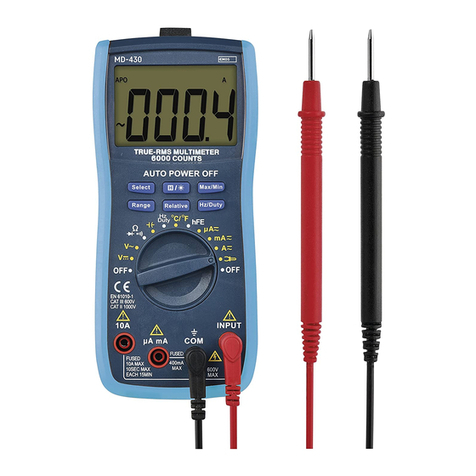
Description of the Device (see Fig. 1)
The M0430 is a 5 ¾ digit, digital multimeter with automatic range
adjustment for measuring DC and AC voltage, DC and AC current, re-
sistance, capacity and temperature, and testing continuity and diodes.
1 – magnetic loop for hanging
2 – screen
3 – Select, , max/min, Range, Relative, Hz/Duty
4 – Circular switch for changing measuring range/choosing a function
5 – 10 A socket – for the plug at the end of the red (positive)
tipped measuring conductor for measuring current in a
current range of 10 A AC/DC

7
6 – µA/mA socket – for the plug at the end of the red (positive)
tipped measuring conductor for measuring current in a
current range to up to 600 mA AC/DC
7 – COM socket – for the plug at the end of the black (negative)
tipped measuring conductor
8 – INPUT socket – for the plug at the end of the red (positive)
tipped measuring conductor for measuring voltage, resist-
ance, diodes, transistors, continuity, capacity, frequency and
duty cycle, temperature
9 – protective casing
10 – removing the probe cover
Technical Information
Screen: 5 ¾ digit LCD with a maximum displayable value of 5,999
Negative polarity indication: the screen automatically displays „-“
Overload indication: the screen displays „OL“
Reading frequency: approx. 2× a second
Temperature measurement range: -20°C to 1,000°C
(-20°C to 300°C with the enclosed thermocouple)
Power supply: 1× 9 V battery, type 6F22 or equivalent
Operating temperature: 0°C to 40°C, relative humidity < 80%
Storage temperature: -10°C to 50°C, relative humidity < 85%
Dimensions: 35 × 90 × 190 mm
Weight: 336 g including battery
Measurement Accuracy
Accuracy is specied for the duration of one year after calibration
and at a temperature of 23°C (±5°C) and air humidity up to 80%.
Accuracy specications are:
±[(% of reading) + (lowest valid digits)]
DC Voltage
Range Resolution Accuracy
600 mV 0.1 mV ±(0.8% + 5)
6 V 1 mV ±(0.8% + 3)
60 V 10 mV
1000 V 1 V ±(1% + 5)
Overload protection: 600 V DC/AC rms

8
Maximum input current: 600 V DC
Input impedance: 10 MΩ
Measure 1,000 V DC range in CAT II
AC Voltage
Range Resolution Accuracy
600 mV 0.1 mV ±(1.2% + 8)
6 V 1 mV
±(1.2% + 6)60 V 10 mV
600 V 100 mV
750 V 1 V ±(1.2% + 8)
Overload protection: 600 V DC/AC rms
Input impedance: 10 MΩ
Frequency range: 40 Hz to 400 Hz
Maximum input voltage: 600 V AC rms CAT III
Measure 750 V AC range in CAT II, CAT III
Response: True RMS, corresponding to a calibrated eective value
of a sine wave.
Direct Current (DC)
Range Resolution Accuracy
600 µA 0.1 µA
±(0.8% + 5)
6000 µA 1 µA
60 mA 10 µA
600 mA 100 µA
10 A 10 mA ±(1.5% + 3)
Overload protection:
µA/mA range: 500 mA/600 V fuse, type F, Ø 6.3 × 32 mm.
10 A range: 10 A/600 V fuse, type F, Ø 6.3 × 32 mm.
Maximum input current: µA/mA socket max. 600 mA; 10 A socket
max. 10 A (when measuring current above 5 A; the measurement
duration must be max. 10 seconds and further measurement may
only be made after 15 minutes)
Voltage drop: 60 mV for 600 µA/60 mA range, 600 mV for
6000 µA/600 mA/10 A range

9
Alternating Current (AC)
Range Resolution Accuracy
600 µA 0.1 µA
±(1.5% + 8)
6000 µA 1 µA
60 mA 10 µA
600 mA 100 µA
10 A 10 mA ±(2% + 10)
Overload protection:
µA/mA range: 500 mA/600 V fuse, type F, Ø 6.3 × 32 mm.
10 A range: 10 A/600 V fuse, type F, Ø 6.3 × 32 mm.
Maximum input current: µA/mA socket max. 600 mA; 10 A socket
max. 10 A (when measuring current above 5 A; the measurement
duration must be max. 10 seconds and further measurement may
only be made after 15 minutes)
Voltage drop: 60 mV for 600 µA/60 mA range, 600 mV for
6000 µA/600 mA/10 A range
Frequency range: 40 Hz to 400 Hz
Alternating Current (AC) (measurement using clamps – optional
accessory)
Range Resolution Accuracy
200 A 1 mV/1 A ±(2.5% + 10)
600 A 1 mV/10 A
Resistance
Range Resolution Accuracy
600 Ω 0.1 Ω
±(1.5% + 3)
6 kΩ 1 Ω
60 kΩ 10 Ω
600 kΩ 100 Ω
6 MΩ 1 kΩ
60 MΩ 10 kΩ ±(1.5% + 5)
Overload protection: 250 V DC/AC rms
Voltage of an open circuit: approximately 0.25 V

10
Continuity Test
Symbol Description Note
If resistance is lower than 30 Ω, the
built-in buzzer will sound constantly.
If resistance is between 30 Ω and
70 Ω; the built-in buzzer may or may
not sound.
If resistance is higher than 70 Ω, the
built-in buzzer will not sound.
Voltage of an
open circuit:
approximately
0.5 V
Overload protection: 250 V DC/AC rms
Diode Test
Symbol Description Note
The approximate voltage of
the diode in the direction of
the current ow will appear
on the screen.
Voltage of an open
circuit: approximately
1.5 V
Overload protection: 250 V DC/AC rms
hFE Transistor Test
Range hFE Testing
current
Testing
voltage
PNP and NPN 0 ~ 1000 Ib ≈ 2 µA Vce ≈ 1 V
Capacity
Range Resolution Accuracy
10 nF 10 pF
±(8% + 5)
100 nF 100 pF
1 µF 1 nF
10 µF 10 nF
100 µF 100 nF
20 mF 10 µF
Voltage of an open circuit: approximately 0.5 V
Overload protection: 500 mA/600 V fuse, type F, Ø 6.3 × 32 mm
This manual suits for next models
1
Table of contents
Languages:
Other Emos Multimeter manuals






Popular Multimeter manuals by other brands







Gossen MetraWatt
Gossen MetraWatt METRAmax 6 operating instructions

PeakTech
PeakTech 4000 Procedure of calibration

YOKOGAWA
YOKOGAWA 90050B user manual
Gossen MetraWatt
Gossen MetraWatt METRALINE DMM16 operating instructions

Fluke
Fluke 8846A Programmer's manual

Tempo Communications
Tempo Communications MM200 instruction manual