IfSplitCallForwardingisenabledonyoursystem,
thenyoucanforwardinternalcallstoonenumber,
and external calls to another (e.g., internal calls
toext.2103;externalcallstoext.4671).WithSplit
Call Forwarding enabled, you can use different
Feature Access Codes for internal and external
calls. See your Communications Department to
find out whether this feature is enabled. If it is
disabled, all calls are forwarded to one
destination.
Condition codes let you forward calls under
different circumstances. For instance, you may
onlywantcallstobeforwardedifyourlineisbusy.
Condition codes are listed below.
You can also program Call Forwarding on your
telephone from another extension, by using the
CallForwarding—IAmHerefeatureaccesscode.
Set Up Call Forwarding
OEnter the appropriate Call Forward
feature access code
OEnter the desired condition code
for Follow Me, Busy, No Answer, or Busy/No Answer
(see “Forwarding Your Calls” above).
ODial extension number
to which calls are to be forwarded.
OReplace the handset.
Call Forwarding is now activated.
Forwarding to an External Number
Calls can also be forwarded to an external
number.
OEnter the appropriate Call Forward
feature access code
OEnter the desired condition code
for Follow Me, Busy, No Answer, or Busy/No Answer
(see “Forwarding Your Calls” above).
OEnter the Abbreviated Dial feature
access code.
OEnter the Abbreviated Dial Index
Number
for the external telephone number to which calls are
to be forwarded. See “Abbreviated Dial” for
information on Abbreviated Dial Index Numbers.
OReplace the handset.
Call Forwarding to an external number is activated.
Cancel Call Forwarding
ODial the appropriate Call Forward
feature access code
DO NOT dial a condition code or destination number.
OR
ODial the Clear All Features feature
access code.
Note: This also cancels any Callback or Do Not
Disturb features that you have activated.
OReplace the handset.
The current forwarding is canceled.
Set Up Call Forwarding at Another Extension
You can set up call forwarding on your own
telephone, from another extension.
OEnter the Call Forward — I Am Here
feature access code.
ODial your own extension number.
OReplace the handset.
All calls at your extension are automatically
forwarded to this extension.
Cancel Call Forwarding from Another Extension
OEnter the Call Forward — Cancel I Am
Here feature access code
on the telephone where this feature was enabled.
OReplace the handset.
Call Forward - I Am Here is canceled.
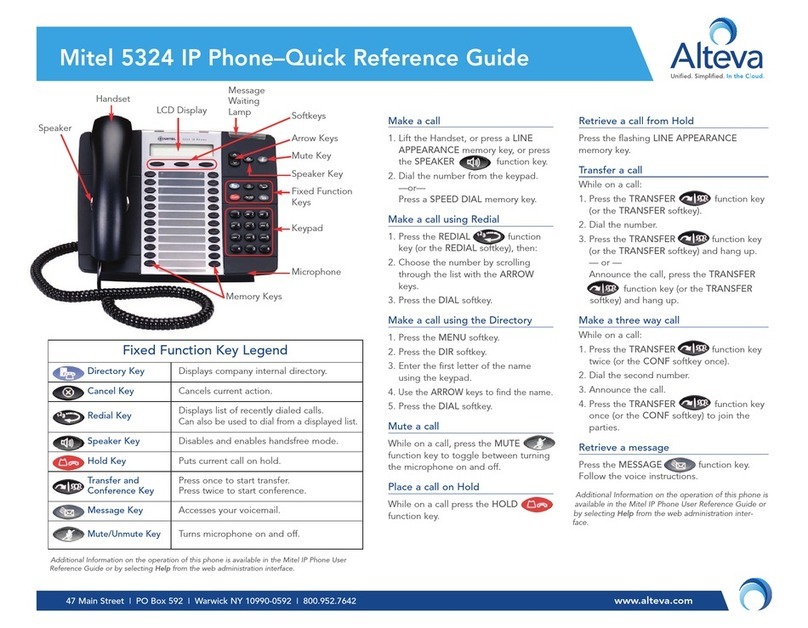
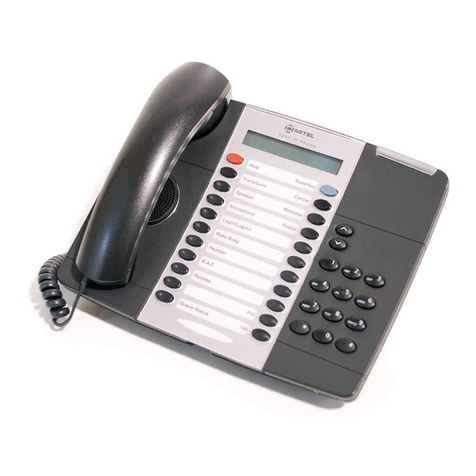
MESSAGES
Do You Have a Message Waiting
If someone has left a message for you with the
Attendant,theMessage Lamponyourtelephone
will flash. Simply press the MESSAGE key to
place a call to the Attendant to receive your
message.Acaller at another extension may also
leave a message for you to call. This will cause
the Message Lamp on your set to flash. Press
MESSAGE to automatically place a call to that
extension.
Send a Message on Busy/No Answer
OWhen you hear busy tone, or there is
no answer, press MESSAGE
1 Follow Me Allyourincoming calls are
forwarded.
2 Busy Your calls are forwarded
when your telephone is
busy.
3 No Answer Your calls are forwarded
when your telephone is
unanswered.
4 Busy/No Answer Your calls are forwarded
when your telephone is
busy or unanswered.
CALL PARK - DESTINATION PHONE CALL PICKUP CAMP ON DO NOT DISTURB CALL FORWARD