
Ricoh P3000 User manual

For safe and correct use, be sure to read the Safety Information in "Read This First" before using the machine.
1
Preparing to Use the Machine
2
Operating the Machine
3
Packing Up the Machine
4
Troubleshooting
5
Appendix
Device Reference


TABLE OF CONTENTS
Manuals for This Machine.................................................................................................................................3
Introduction.........................................................................................................................................................4
Disclaimer........................................................................................................................................................4
Notes...............................................................................................................................................................4
How to Read This Manual.................................................................................................................................5
Symbols...........................................................................................................................................................5
Model-Specific Information...............................................................................................................................6
Precautions for Use.............................................................................................................................................7
Handling This Product....................................................................................................................................7
Cleaning..........................................................................................................................................................7
Wireless Networking.....................................................................................................................................8
Copyright Notice............................................................................................................................................8
1. Preparing to Use the Machine
Preparing to Start Using the Services................................................................................................................9
Checking the Package Contents.....................................................................................................................11
Guide to Components......................................................................................................................................13
Front and Top view......................................................................................................................................13
Rear and Bottom view.................................................................................................................................14
Control Panel................................................................................................................................................15
Place to Install...................................................................................................................................................17
Installation Requirements.............................................................................................................................17
Operating Environment for This Machine..................................................................................................21
Connecting the Power Cord Set......................................................................................................................24
Connecting a Video Output Device................................................................................................................27
Connecting an Ethernet Cable........................................................................................................................28
Connecting a External Microphone Speaker................................................................................................29
2. Operating the Machine
Raising the Camera Unit..................................................................................................................................31
Turning On the Power......................................................................................................................................33
Turning on the Machine for the First Time......................................................................................................34
Adjusting the Camera......................................................................................................................................36
Using the Camera To Share Information........................................................................................................38
Adjusting the Volume.......................................................................................................................................39
1

Adjusting the Speaker Volume....................................................................................................................39
Muting the Microphone..............................................................................................................................39
Turning Off the Power......................................................................................................................................41
Putting the Camera Back Into Place................................................................................................................42
3. Packing Up the Machine
Removing the Power Cord Set and Video Output Device and Packing Up the Machine..........................43
4. Troubleshooting
When You Have Problems Operating the Machine.....................................................................................47
5. Appendix
Specifications....................................................................................................................................................53
Precautions for Use..........................................................................................................................................55
Trademarks.......................................................................................................................................................56
INDEX.............................................................................................................................................................57
2

Manuals for This Machine
Read this manual carefully before you use this machine.
Refer to the manuals that are relevant to what you want to do with the machine.
Read This First
Explains important items to know when using this product. It also describes how to set up this
product when using it for the first time.
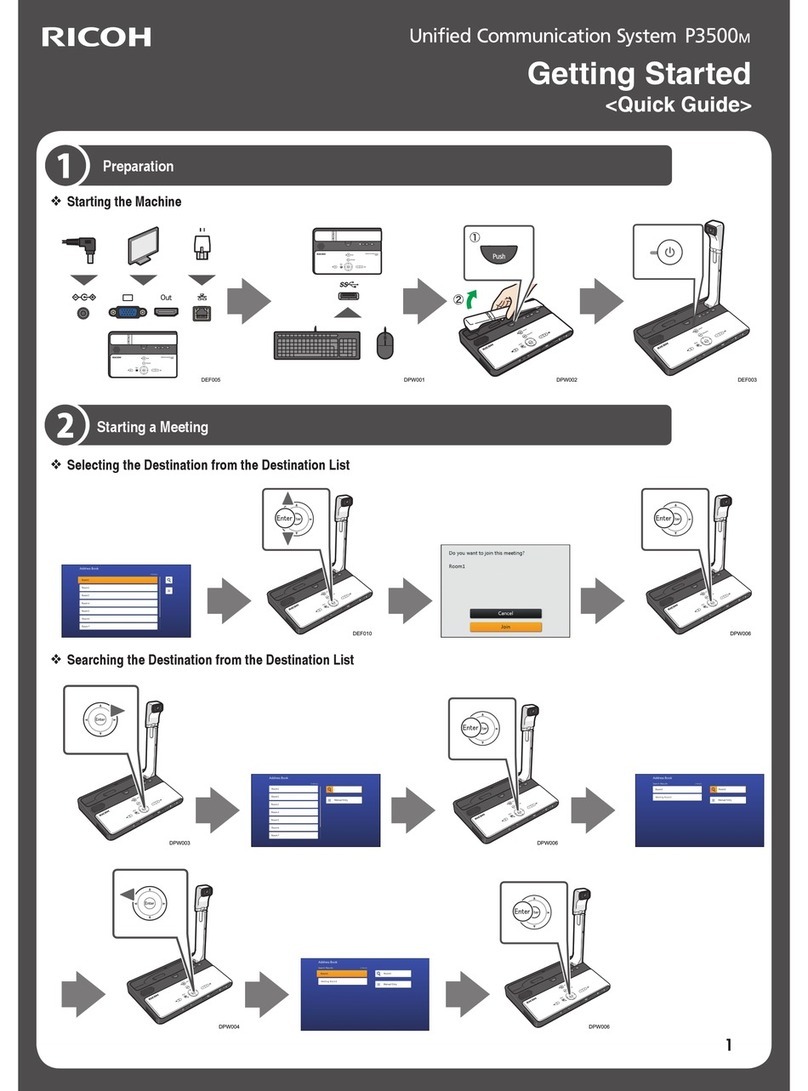
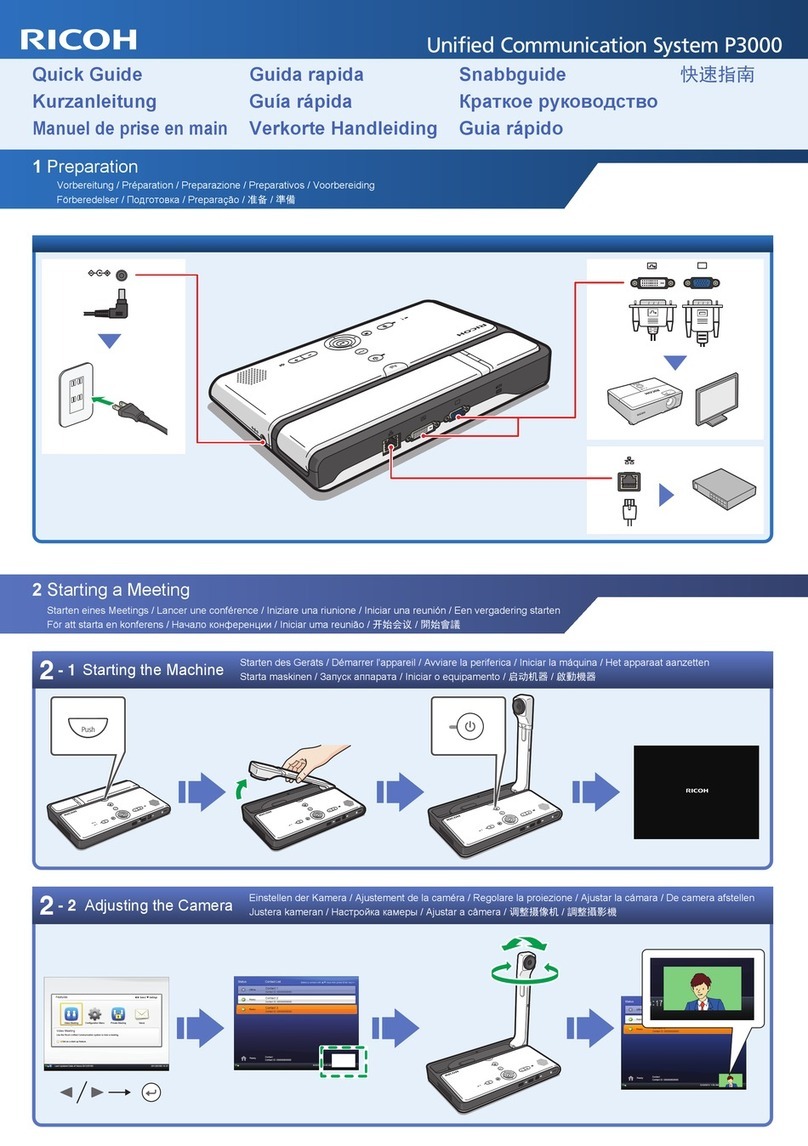
Quick Guide
Explains how to start a meeting.
Device Reference (This Manual)
Explains how to set up and operate the machine.
This manual also describes the specifications of the machine and provides information about how
to troubleshoot problems that occur.
Features Reference
Explains how to start a meeting and describes the features of the machine.
This manual also provides information about how to troubleshoot feature and network problems
that occur.
3

Introduction
Disclaimer
Contents of this manual are subject to change without prior notice.
In no event will the company be liable for direct, indirect, special, incidental, or consequential damages
as a result of handling or operating the machine.
Notes
The manufacturer shall not be responsible for any damage or expense that might result from the use of
parts other than genuine parts from the manufacturer with your office products.
Two kinds of size notation are employed in this manual.
Some illustrations in this manual might be slightly different from the machine.
4

How to Read This Manual
Symbols
This manual uses the following symbols:
Indicates points to pay attention to when using the machine, and explanations of likely causes of
damage to machine or loss of data. Be sure to read these explanations.
Indicates supplementary explanations of the machine's features, and instructions on resolving user
errors.
[ ]
Indicates the names of keys on the display or control panel.
(mainly Europe and Asia)
(mainly North America)
Differences in the functions of Region A and Region B models are indicated by two symbols. Read the
information indicated by the symbol that corresponds to the region of the model you are using. For
details about which symbol corresponds to the model you are using, see p.6 "Model-Specific
Information".
• Some of the key names that appear in the on-screen instructions or messages might differ from
those shown on the machine, depending on the region in which you live. The screen displays a key
name, followed by the corresponding key mark. If the name of the key is different, use the
corresponding mark to identify the key.
5

Model-Specific Information
This section explains how you can identify the region your machine belongs to.
There is a label on the bottom of the machine, located in the position shown below. The label contains
details that identify the region your machine belongs to. Read the label.
CMJ001
The following information is region-specific. Read the information under the symbol that corresponds to
the region of your machine.
(mainly Europe and Asia)
If the label contains the following, your machine is a region A model:
• 220V-240V
(mainly North America)
If the label contains the following, your machine is a region B model:
• 110V
• Dimensions in this manual are given in two units of measure: metric and inch. If your machine is a
Region A model, refer to the metric units. If your machine is a Region B model, refer to the inch
units.
6

Precautions for Use
Handling This Product
Observe the following points when moving the machine:
• Turn off the machine and remove the power plug from the AC outlet.
• Remove all the connector cables connected to the machine.
• Return the camera to the closed position.
• Do not attempt to raise or move this machine by the camera unit.
• When carrying the machine by hand
• Use the bag that comes with the machine.
• When traveling by plane, take this machine onboard as carry-on luggage.
• When Transporting the Machine
This machine contains a large number of glass and precision parts. Observe the following points to
prevent the machine from being damaged by excessive shock:
• Wrap the machine in cushioning material to prevent it from being directly exposed to shock.
• Place the machine in the supplied bag and pack it in the original box or a sturdy cardboard
box.
• Inform the carrier that the machine is a piece of precision equipment.
• For more information about transporting the machine, consult your carrier.
Avoid contact with rubber and plastic materials for an extended period of time. Doing so may lead to
discoloration or cause the exterior coating to peel off.
Do not use this machine for an extended period of time. Doing so may lead to failure or shorten the
product life.
Cleaning
• Never use benzene or thinner to clean the machine. Doing so may lead to deformation,
discoloring, or cause the exterior coating to peel off.
• Do not use a chemically treated cloth.
• Remove the dust that accumulates in the air outlet and inlet periodically. If the air outlet or inlet
becomes clogged, the flow of air inside the machine decreases. Poor air flow can result in failure.
7

Wireless Networking
This product features a certified construction. Disassembling or modifying this product without permission
may be punishable by law.
Copyright Notice
Using this machine to perform any of the following acts, without permission from the copyright holder,
for purposes other than personal use may constitute an infringement on the copyright and/or
neighboring rights of the commercial video software or cable broadcasting program. These acts include
broadcasting or transmitting commercial video software or cable broadcasting programs, modifying
videos, such as by freezing, or resizing videos to be displayed in an aspect ratio different from the
original. To avoid the risk of possible infringement, we advise you to obtain permission from the
copyright holder and take all other measures necessary before performing any of the above-mentioned
acts.
8
Other manuals for P3000
3
Table of contents
Other Ricoh Conference System manuals
Ricoh
Ricoh G5000H User manual
Ricoh
Ricoh P1000 User manual
Ricoh
Ricoh P3000 User manual

Ricoh
Ricoh P3500 Quick start guide
Ricoh
Ricoh Meeting 360 V1 User manual
Ricoh
Ricoh P3500M User manual
Ricoh
Ricoh P3500 User manual

Ricoh
Ricoh P3000 User manual

Ricoh
Ricoh Meeting 360 V2 User manual
Ricoh
Ricoh P3500M User manual
Popular Conference System manuals by other brands

Kramer
Kramer VIA GO quick start guide

ProSoft Technology
ProSoft Technology AN-X4-AB-DHRIO user manual

Sony
Sony PCS-I150 Operation guide

Middle Atlantic Products
Middle Atlantic Products VTC Series instruction sheet

AVT
AVT MAGIC AC1 Go Configuration guide

Prentke Romich Company
Prentke Romich Company Vanguard Plus Setting up and using











