EnglishDeutsch
 logo
Brands
  1. Home
  2. •
  3. Brands
  4. •
  5. Tenma
  6. •
  7. Test Equipment
  8. •
  9. Tenma TEN01057 User manual

Tenma TEN01057 User manual

Other Tenma Test Equipment manuals

Tenma 72-490 User manual

Tenma

Tenma 72-490 User manual

Tenma 72-3575 User manual

Tenma

Tenma 72-3575 User manual

Tenma 72-3565 User manual

Tenma

Tenma 72-3565 User manual

Tenma 72-9405 User manual

Tenma

Tenma 72-9405 User manual

Tenma 72-7615 User manual

Tenma

Tenma 72-7615 User manual

Tenma DSO User manual

Tenma

Tenma DSO User manual

Tenma 72-2665 User manual

Tenma

Tenma 72-2665 User manual

Tenma 72-6947 User manual

Tenma

Tenma 72-6947 User manual

Tenma 72-2680 User manual

Tenma

Tenma 72-2680 User manual

Tenma 72-6802 User manual

Tenma

Tenma 72-6802 User manual

Tenma 72-6694 User manual

Tenma

Tenma 72-6694 User manual

Tenma 72-7985 User manual

Tenma

Tenma 72-7985 User manual

Tenma 72-9400A User manual

Tenma

Tenma 72-9400A User manual

Tenma 72-9966 User manual

Tenma

Tenma 72-9966 User manual

Tenma 72-7630 User manual

Tenma

Tenma 72-7630 User manual

Tenma 72-14520 User manual

Tenma

Tenma 72-14520 User manual

Tenma 72-9355 User manual

Tenma

Tenma 72-9355 User manual

Tenma 72-10175 User manual

Tenma

Tenma 72-10175 User manual

Tenma DSO Series User manual

Tenma

Tenma DSO Series User manual

Tenma 72-7910 User manual

Tenma

Tenma 72-7910 User manual

Tenma 72-8710 User manual

Tenma

Tenma 72-8710 User manual

Tenma 72-2650 User manual

Tenma

Tenma 72-2650 User manual

Tenma 72-17175 User manual

Tenma

Tenma 72-17175 User manual

Tenma 72-2650 User manual

Tenma

Tenma 72-2650 User manual

Popular Test Equipment manuals by other brands

SMART KANAAD SBT XTREME 3G Series user manual

SMART

SMART KANAAD SBT XTREME 3G Series user manual

Agilent Technologies BERT Serial Getting started

Agilent Technologies

Agilent Technologies BERT Serial Getting started

Agilent Technologies N3280A user guide

Agilent Technologies

Agilent Technologies N3280A user guide

Lifeloc R.A.D.A.R. quick start guide

Lifeloc

Lifeloc R.A.D.A.R. quick start guide

Fluke T5-600 Service information

Fluke

Fluke T5-600 Service information

Mercury TSL01 user manual

Mercury

Mercury TSL01 user manual

MAHA MBT Series Original operating instructions

MAHA

MAHA MBT Series Original operating instructions

Fuji Electric P-61 instruction manual

Fuji Electric

Fuji Electric P-61 instruction manual

ETC SealerAtor user manual

ETC

ETC SealerAtor user manual

Skyfine ETHYWAY V2 user manual

Skyfine

Skyfine ETHYWAY V2 user manual

Appion G5 Twin Operation manual

Appion

Appion G5 Twin Operation manual

PCB Piezotronics 8159-0112A Installation and operating manual

PCB Piezotronics

PCB Piezotronics 8159-0112A Installation and operating manual

BW Technologies MicroDock II user manual

BW Technologies

BW Technologies MicroDock II user manual

Sun Nuclear 1027 user guide

Sun Nuclear

Sun Nuclear 1027 user guide

Biomark HPR LITE READER user manual

Biomark

Biomark HPR LITE READER user manual

Hioki 3169-20 instruction manual

Hioki

Hioki 3169-20 instruction manual

Ashcroft ATE-100 operating manual

Ashcroft

Ashcroft ATE-100 operating manual

Rohde & Schwarz RTA4000 user manual

Rohde & Schwarz

Rohde & Schwarz RTA4000 user manual

https://manuals.online logo
https://manuals.online logoBrands
  • About & Mission
  • Contact us
  • Privacy Policy
  • Terms and Conditions

Copyright 2026 Manuals.Online. All Rights Reserved.

AC VOLTAGE DETECTOR/FLASHLIGHT
TEN01057
Read and understand all of the
instructions and safety
information in this manual before
operating or servicing this tool.
Description
The Volt finder voltage detector is intended to
check for the presence of AC voltage,
signaling the user with an LED on. Built-in
bright flashlight with ON/OFF button.
Feature/Benefits:
Non-Contact Detection of AC Voltage
200~1000VAC (50/60Hz).
Rugged, double molded case.
May be used to find a break in a wire or
detect the presence of voltage at outlets,
lighting fixtures, circuit breakers, wires
and cables.
Bright LED if voltage is present.
Built-in bright flashlight with ON/OFF
button.
Convenient size with pocket clip.
An essential tool for every electrician and
tradesperson.
Safety
This instruction manual and any markings on
the tool provide information for avoiding
hazards and unsafe practices related to the use
of this tool. Observe all of the safety
information provided.
Important Safety Information
WARNING
Read and understand this
material before operating or
servicing this equipment.
Failure to understand how to
safely operate this tool can
result in an accident causing
serious injury or death.
WARNING
Electric shock hazard:
Contact with live circuits can
result in severe injury or death.
WARNING
Electric shock hazard:
Do not use the unit if it is wet or
damaged.
Do not apply more than the rated
voltage between the probe tip and earth
ground.
Do not operate with the case open.
Failure to observe these warning can result
in severe injury or death.
CAUTION
Do not attempt to repair this unit. It
contains no user-serviceable parts.
Do not expose the unit to extremes in
temperature or high humidity. See
Specifications.
Failure to observe these precautions can
result in injury and can damage the
instrument.
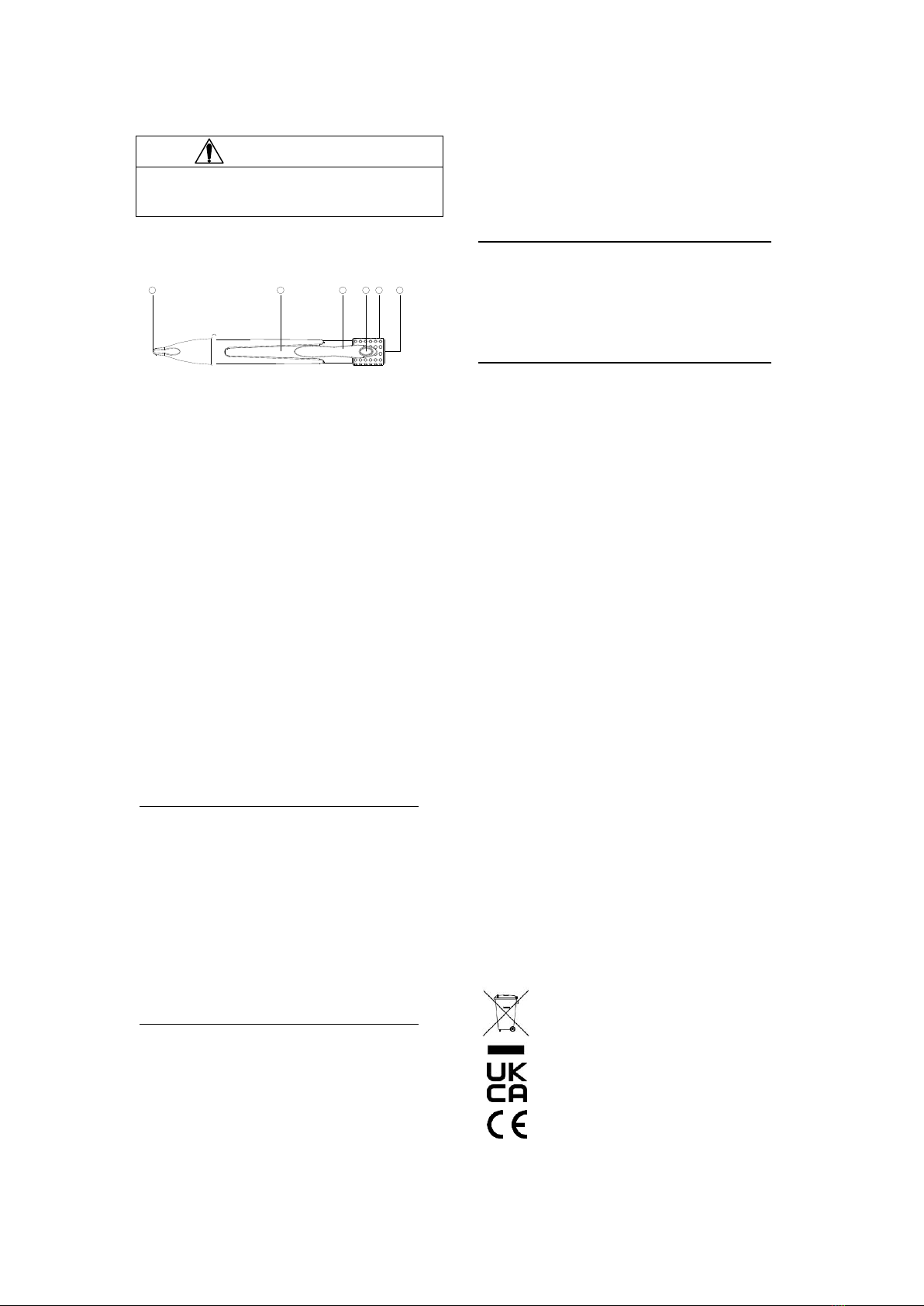
6 5 4 3 2 1

IMPORTANT
Using this unit near equipment that
generates
Detector Description
①Flashlight
②Detector cap
③Flashlight power ON/OFF
④Detector handle
⑤Detector body
⑥Detector clip
Operation
The Voltage Detector is useful for the
identifying hot and neutral conductors, finding
a break in a wire, and detecting the presence
of AC voltage at:
Outlets
Switches
Circuit breakers
Fuses
Wires and cables
Note: The voltage detector can be used to find
a break in a wire:
To find a break in a hot conductor, trace
the wire until the signal stops.
To find a break in a neutral conductor,
connect a load between the hot and
neutral. Trace the wire until the signal
stops.
1. Test the unit on known functioning circuit
or component.
If the unit does not function as
expected on a known functioning
circuit, replace the batteries.
If the unit still does not function as
expected, send the unit to repair.
2. Place the probe tip on or near the circuit
or unit to be tested.
LED indicate the presence ofAC Voltage
from 200~1000 VAC (50/60Hz).
Note: The voltage detector cannot detect
voltage on armored cable or on cable in
conduit, behind panels, or in metallic
enclosures.
Specifications
Indicators: LED
Voltage Range: 200~1000 VAC (50/60Hz)
Over voltage Category: Category III - 1000V
(non-condensing)
Pollution Degree: 2

Battery: Two 1.5 volt batteries (AAA, NEDA
24A or IEC LR 03)
Battery Replacement
1. Disconnect the unit from the circuit.
2. Remove the battery compartment cove.
3. Replace the batteries (observe polarity).
4. Replace the battery compartment cove.
INFORMATION ON WASTE DISPOSAL
FOR CONSUMERS OF ELECTRICAL &
ELECTRONIC EQUIPMENT.
When this product has reached the end of its life it
must be treated as Waste Electrical & Electronic
Equipment (WEEE). Any WEEE marked products
must not be mixed with general household waste, but
kept separate for the treatment, recovery and
recycling of the materials used. Contact your local
authority for details of recycling schemes in your
area.
Made in China PR2 9PP
PO Box 13362 Dublin 2